For builders
Testing an LLM feature, from a red test to the test report
Eight moments of a tester's week, from a test that failed in CI to the test report the release is decided on, each with the page that reads it.
On this page (9)
A test of an LLM feature has a pass rate, not a pass bit. The same test case can pass on one run and fail on the next, because each run is one draw from that rate, and a single draw says little on its own. The one-draw reading is our synthesis. The steps below rest on a map of the statistics behind a test number, an analysis of when a difference between two builds is larger than what a rerun alone would show and a study of how a model judge’s own errors move the rate.
Each of the eight steps below names what to have in hand, which page to open, and what the page answers.
Read these before you trust the results.
- A test failed in CI: rerun that case and read the reruns on Reruns of one failing case.
- A build passed after retries: read how many cases needed one on CI retries.
- Two builds, same cases: count what broke and what was fixed on the McNemar test for paired runs.
- Write the rate, its interval and the grader’s error rates into the Test completion report.
Rerun the failing case before calling it broken
A case that failed in CI may have broken, or it may have failed the way flaky tests do, where no single run can settle a verdict. To tell the difference, you need the case’s earlier pass record and the ability to rerun it. A results export or a retry log alone is not enough.
Open Reruns of one failing case on the repeated-run variance planner. Type the earlier pass count and run count, then each rerun as it finishes. The page reads the reruns against a stopping rule and reports one of three verdicts: “below its usual rate”, “at its usual rate” or “rerun again”. At the rerun cap with no decision the page says inconclusive, more reruns needed. The broken rate is the pass rate below which the case counts as broken; type your tier’s own value (the default is 70%, the CI gate contract’s example floor).
On the page’s typed defaults, with 49 passes in 50 earlier runs, two failures within the first four reruns call the case below its usual rate, and eight passes in a row call it at its usual rate.
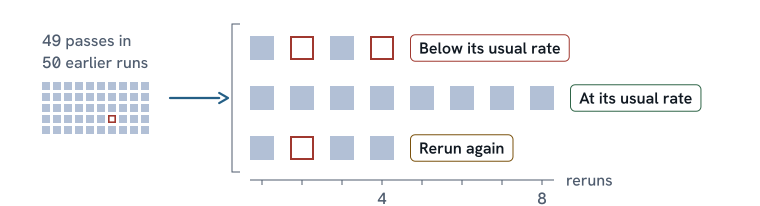
A case that keeps flipping gets its rate measured across reruns on Run rows. When many cases go red at once, the CI gate contract forecasts how often that happens by chance.
The build passed on a retry
A retry collapses a test case’s attempts to one question: did any attempt pass? If a case fails twice and passes on the third, it counts as a pass. The regression hides in the build’s color and shows in the retry count.
Open CI retries on the reliability-at-k estimator. Type the retry policy, or paste a retry log with the case id, attempts used and final result per case.
In the policy example, 200 test cases pass 95% per attempt when healthy, up to 3 attempts, and 10 cases have regressed to 60%: the ten show no failure 51.6% of the time (0.6% with a single attempt). The build goes green 50.4% of the time with the regression and 97.5% without it. About 10 cases need a retry without the regression and about 13.5 with it. In the log example, the build is green, 14 of 200 cases needed a retry, and the first-try pass rate is 93.0% (186 of 200).
To ask whether one retried case broke, take that case back to Reruns of one failing case on the planner. Next: the tier-placement guide, or the eval CI time and cost planner for time and cost per CI tier.
A clean result proves a pass-rate floor
Zero failures prove a floor on the pass rate, and the floor depends on how many cases ran. You need the counts from a results export: cases checked and failures found.
Open Runs for a claim on the pass-rate CI calculator, where each case checked counts as one run, and press “Load a clean 200”: even 200 of 200 clean runs cannot prove a 99% pass-rate floor, because the failure rate could still be as high as 1.4867% at 95% one-sided confidence. Reaching that floor takes 299 clean runs.
Batch audit plan on the same page sizes one batch of outputs checked by hand before a release. The plan is fixed before the sample is drawn, naming the risk of rejecting a good batch and the risk of accepting a bad one. In the page’s example (2,400 replies from 240 prompt templates, 10 each, a good batch failing 1% and a bad one 8%), a random draw checks 65 and accepts the batch if at most 2 fail. A draw grouped by template (10 per template, with the similarity at 0.2 because replies from the same template tend to pass or fail together) checks 171 and accepts if at most 6 fail. The review sample drawer draws it.
Two builds on the same cases
When two builds ran the same test cases, the paired read counts which cases broke and which were fixed in one comparison: confirmation and regression together. You need pass or fail per case from both builds.
The McNemar test for paired runs reads the cases that changed. The page calls each case an item. In the page’s worked example, 200 items ran on both builds. The new build (the candidate) passed 174 and the old build (the baseline) passed 160: 180 items agreed, 17 flipped to pass and 3 flipped to fail. Seventeen fixed against three broken is more change than chance alone would give, and the gain is +7.0 points with a 95% interval of +2.6 to +11.7 points.
Next: Same items, joined on id on the eval A/B comparator lists which cases broke and which were fixed by id. The no-regression verdict makes the ship call against a margin.
A change decides which tests rerun
A change to the model, the prompt, the grader, retrieval or a tool decides which tests to rerun before any results exist. You need the change and what kind it was.
The change-impact worksheet turns the kind of change into a rerun list with a reason per line and a change record. The golden-set version tracker freezes the baseline metric values the next run is judged against and records which set version the baseline ran on. The eval run register records the plan before results land: which model and prompt version ran on which set version. For a model change in particular, the model-change playbook covers a model change step by step.
The judge’s mistakes move the pass rate
When a model judge grades the test, the judge applies the test oracle, the source of the expected result, and its own mistakes move the pass rate. You need the judge-graded pass count and a sample graded by both the judge and a person: how often the judge agrees with the person on real passes and on real failures.
Open Corrected rate on the judge bias correction calculator. On the page’s defaults, 700 of 1,000 judged passes, the judge agrees with the person on 90 of 100 real passes and 85 of 100 real failures: the corrected pass rate is 73.3%, about three points higher than without the correction, with a 95% interval of 66.0% to 80.7%, about two and a half times wider than the uncorrected interval of 67.1% to 72.8%.
When the judge changes, Compare judges on the same page reads the shift. The human labels for judge page sizes how many labels to collect, and agreement over time is tracked on the judge agreement tracker. On the golden-set size planner, “If a model judge grades it” shows what a judge’s error rates cost in test cases.
The same input said differently
When the same input is phrased differently on one version, some cases may flip that a plain rerun of the unchanged input would not. The rerun sets the floor: how many cases flip from running again? On the prompt robustness analyzer, choose “Prompt variants” and type the name of the column that holds the plain rerun into “Plain rerun column”. The page reads each variant’s flips against the rerun’s flips on the same items and reports an interval for each. A variant that flips no more than the plain rerun shows rerun noise, not a robustness failure.
In the page’s example (20 items, four variants), the plain rerun flipped 2 of 20. The page marks the format variant “Flipped more than rerun”: it flipped 8 of 20, 30 points more than the rerun (interval +6.4 to +50.8 points). Paraphrase, reorder and noise are inconclusive: none shows a flip difference against the rerun that is clear of zero.
When one rerun is not enough, Run rows on the planner measures more.
The release is decided on a test report
The test completion report records the evidence a release decision rests on. You need the release exit criteria and the run’s counts.
Open the Test completion report section on the eval readout builder. The test report names who prepared it, and the readout carries the decider in its own field. Each exit criterion carries a status: “Met”, “Across the bar” or “Missed”, with a reason for a miss; “Across the bar” records that the interval straddles the bar. The test report also carries repeats per case, the observed rate with its interval, the catch rate and false alarm rate of whatever graded the cases (a code check, a person or a model judge) against a person’s labels, deviations from the plan, residual risk and threats to validity.
In the page’s example, 31 of 40 cases passed, 77.5% with a 95% interval of 62.5% to 87.7%. The grader caught 5 of 9 real failures and flagged 4 of 31 real passes. The example carries one criterion met, one across the bar and one missed with its reason. Each case ran once, which the test report names as a threat to validity. The proposed decision is a limited rollout.
Before you quote a rate, check for harness error, empty rows and unreadable rows on the eval results auditor. The release gate designer builds the gate the decision is made against.
When the week starts somewhere else
If the team no longer trusts the AI tests in CI, measure the noise on Run rows, then read what the CI gate contract shows per tier and for quarantined cases.
No black-box coverage criterion exists for a model. If the team inherits a suite to vouch for, how much is enough is a sample-size question (Runs for a claim). Requirements and risks go on the eval coverage matrix or the risk-to-test mapper.
If an agent let a defect through, write the case that would have caught it (failure to case mapping) and prove it fails on the old build (a bug you already fixed should show as fixed). When many runs fail at once, count the distinct First recorded errors as a starting list for a person to check.